
Reviews
WAVLINK 4-Port HDMI Splitter Review – Expand Your Workspace with Quad Monitor 4K Support

Introduction
As multitasking becomes essential for modern professionals, having multiple monitors is no longer a luxury—it’s a necessity. Whether you’re managing spreadsheets, editing videos, monitoring financial markets, or handling multiple projects simultaneously, extra screen space can dramatically improve productivity.
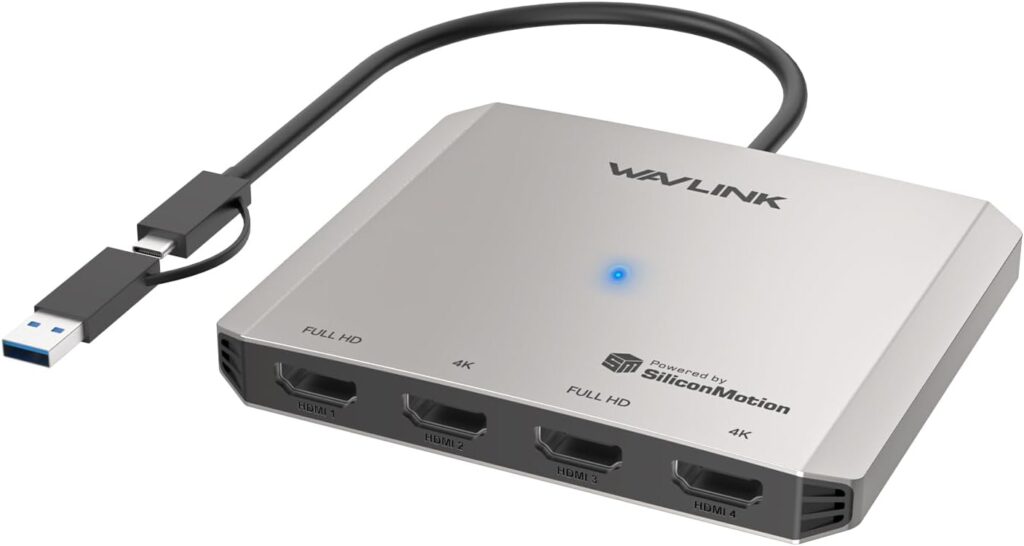
The WAVLINK 4-Port HDMI Splitter USB C to Quad Monitor Adapter is designed to help users maximize their workspace by supporting up to four external displays through a single connection. Compatible with both USB-C and USB-A devices, this versatile adapter provides an efficient solution for users who need expanded display capabilities without investing in a complex docking station.
In this review, we’ll examine its design, features, performance, compatibility, and overall value.
Design and Build Quality
The WAVLINK Quad Monitor Adapter features a compact and lightweight design that makes it ideal for both office and mobile use. Despite its small size, it offers impressive display expansion capabilities.
Its sturdy construction ensures durability for everyday use, while the portable design allows users to carry it easily between workstations, meeting rooms, and travel destinations.
The simple layout keeps setup straightforward and minimizes desk clutter.
Key Features
Quad Monitor Support
The standout feature of this adapter is its ability to support up to four external HDMI displays.
Benefits include:
- Expanded workspace
- Improved multitasking
- Better workflow management
- Increased productivity
- Enhanced viewing flexibility
Users can extend or mirror displays depending on their specific requirements.
4K Resolution Support
The adapter supports high-resolution output, providing sharp images and detailed visuals.
This makes it suitable for:
- Professional presentations
- Graphic design
- Video editing
- Business applications
- Data analysis
Clear visuals contribute to a more comfortable and efficient working experience.
Universal USB-C and USB-A Compatibility
Unlike many display adapters that support only USB-C devices, this model works with both USB-C and traditional USB-A connections.
This versatility allows users to connect a wider range of devices, including:
- Modern laptops
- Desktop computers
- Business workstations
- Older systems with USB-A ports
The universal design increases flexibility across different setups.
Multi-Monitor Productivity
One of the biggest advantages of using multiple monitors is the ability to organize tasks more effectively.
With four displays available, users can dedicate screens to:
- Email communication
- Video conferencing
- Research and browsing
- Project management tools
- Financial charts and dashboards
This setup reduces the need to constantly switch between applications and can significantly improve workflow efficiency.
Ideal for Professional Users
Professionals who benefit most from quad-monitor setups include:
- Stock traders
- Crypto traders
- Financial analysts
- Software developers
- Graphic designers
- Video editors
- Digital marketers
- Customer support teams
The ability to monitor multiple applications simultaneously creates a more streamlined working environment.
Compatibility
The WAVLINK adapter supports a broad range of devices and operating systems.
Compatible platforms include:
- Windows laptops
- Windows desktops
- MacBook models
- Apple Silicon devices
- USB-C systems
- USB-A systems
The broad compatibility makes it a versatile solution for mixed-device environments.
Driver Installation
Unlike simple plug-and-play HDMI adapters, this device requires driver installation to unlock its full display capabilities.
While this adds an extra setup step, it allows the adapter to support multiple displays beyond the limitations of many standard USB video adapters.
Once installed, most users can enjoy stable multi-monitor performance.
Performance in Daily Use
For everyday office tasks, the adapter performs exceptionally well.
Users can comfortably:
- Manage multiple spreadsheets
- Attend virtual meetings
- Conduct research
- Create presentations
- Monitor dashboards
- Handle administrative tasks
The additional screen space improves organization and reduces workflow interruptions.
Pros
Supports Up to Four Displays
Provides exceptional workspace expansion for productivity-focused users.
High-Resolution Output
Delivers sharp visuals suitable for professional applications.
Universal Connectivity
Works with both USB-C and USB-A devices.
Portable Design
Easy to carry and use in different work environments.
Excellent for Multitasking
Ideal for users who regularly work with multiple applications simultaneously.
Cons
Driver Installation Required
Additional software setup may be necessary before use.
Not Designed for High-End Gaming
Primarily intended for productivity and office applications.
Performance Depends on System Resources
Display performance may vary depending on computer specifications.
Who Should Buy the WAVLINK 4-Port HDMI Splitter?
This adapter is an excellent choice for:
- Remote workers
- Business professionals
- Financial traders
- Software developers
- Content creators
- Students
- Office users
- Multi-monitor enthusiasts
Anyone looking to expand their laptop or desktop into a powerful multi-screen workstation can benefit from this device.
Final Verdict
The WAVLINK 4-Port HDMI Splitter USB C to Quad Monitor Adapter offers an impressive solution for users who need extensive display expansion without purchasing a full docking station. Its support for up to four monitors, high-resolution output, broad compatibility, and portable design make it a valuable productivity tool.
For professionals who rely on multiple screens to manage complex workflows, monitor data, or improve efficiency, this adapter provides a practical and cost-effective way to create a powerful multi-monitor workspace.
Buy Now: https://amzn.to/3RyWH6x