
Reviews
WD15 USB C Docking Station Review – A Reliable Dual Monitor Dock for Work and Productivity

Introduction
As modern laptops continue to become thinner and more portable, the number of built-in ports often becomes limited. For professionals, students, and remote workers who rely on multiple monitors and peripherals, a docking station can dramatically improve productivity and convenience. The WD15 USB C Docking Station is designed to transform a single USB-C connection into a complete desktop workstation.
Featuring support for dual monitors, Gigabit Ethernet, multiple USB ports, audio connectivity, and compatibility with popular laptop brands such as Dell, HP, Surface, and MacBook, the WD15 remains a practical solution for users who need additional connectivity without sacrificing desk space.https://bestreview.id/2026/05/30/lionwei-usb-3-0-to-dual-hdmi-docking-station-review-expand-your-workspace-with-dual-monitor-support/
Design and Build Quality
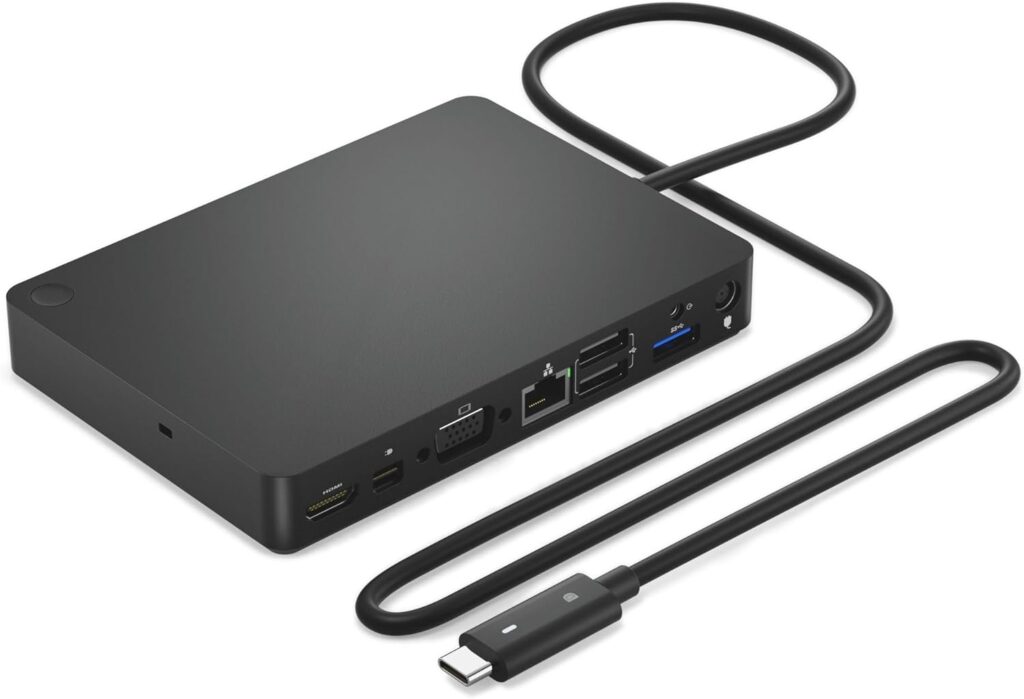
The WD15 Docking Station features a compact and professional design that fits seamlessly into office and home environments. Its sleek black finish gives it a modern appearance while maintaining a business-oriented look.
The dock is built to handle daily professional use, and its compact footprint helps reduce desk clutter compared to using multiple adapters and hubs.
Key Features
Dual Monitor Support
One of the primary reasons users choose the WD15 Docking Station is its ability to support multiple displays.
Available video outputs include:
- HDMI
- Mini DisplayPort
- VGA
These options allow users to connect modern monitors as well as older display devices, making the dock highly versatile for various work environments.
Multiple USB Ports
The docking station provides extensive connectivity through:
- 3 USB 3.0 Ports
- 2 USB 2.0 Ports
This allows users to connect:
- Keyboards
- Mice
- Printers
- External storage devices
- Webcams
- USB accessories
The mix of USB 3.0 and USB 2.0 ports ensures compatibility with both newer and legacy devices.
Gigabit Ethernet Connection
The built-in Gigabit Ethernet port delivers a stable wired internet connection. This is especially useful for users who require reliable connectivity for:
- Video conferencing
- Large file transfers
- Online collaboration
- Remote work
- Streaming and cloud applications
Compared to Wi-Fi, a wired connection often provides improved stability and lower latency.
Audio Connectivity
The docking station includes:
- Audio output
- Speaker out functionality
This enables users to connect headphones, speakers, or other audio equipment without relying on their laptop’s limited ports.
Performance in Daily Use
The WD15 Docking Station performs exceptionally well for everyday office and productivity tasks. Once connected, users can instantly expand their laptop into a full workstation with multiple displays and peripherals.
Whether working with spreadsheets, presentations, video calls, or web applications, the dock provides a smoother and more organized workflow.
Users who frequently switch between office and home environments will appreciate the convenience of connecting all devices through a single cable.
Dual Monitor Productivity Benefits
Adding a second monitor can significantly increase efficiency.
With a dual-monitor setup, users can:
- View emails on one screen while working on documents on another
- Join video meetings while accessing notes simultaneously
- Manage multiple browser windows more efficiently
- Improve workflow for research and data analysis
This makes the WD15 an excellent choice for professionals seeking enhanced productivity.
Compatibility
The WD15 Docking Station is compatible with a variety of popular devices, including:
- Dell laptops
- HP laptops
- Microsoft Surface devices
- MacBook models
- USB-C enabled laptops
Its wide compatibility makes it suitable for mixed-device environments commonly found in offices and educational institutions.
Pros
Excellent Connectivity Options
The combination of video outputs, USB ports, Ethernet, and audio connections provides a complete workstation experience.
Dual Monitor Support
Ideal for multitasking and improving productivity.
Reliable Wired Networking
Gigabit Ethernet ensures stable internet connectivity for professional work.
Compact Design
Occupies minimal desk space while offering extensive functionality.
Broad Device Compatibility
Works with many popular laptop brands and USB-C systems.
Cons
Older Display Standards Included
While VGA support increases compatibility, some users may prefer additional modern display outputs.
Limited High-End Display Features
The dock is optimized for productivity rather than advanced gaming or graphics-intensive workloads.https://bestreview.id/2026/05/30/hodo-usb-c-docking-station-dual-monitor-adapter-review-a-powerful-multi-display-solution-for-modern-laptops/
USB-C Compatibility Required
Users should verify that their laptop supports the necessary USB-C display functions for full functionality.
Who Should Buy the WD15 Docking Station?
This docking station is an excellent choice for:
- Remote workers
- Office professionals
- Students
- Business users
- Teachers and educators
- Financial analysts
- Customer support teams
- Home office users
Anyone looking to expand a laptop into a productive desktop workstation will benefit from its connectivity options.
Final Verdict
The WD15 USB C Docking Station remains a dependable and practical docking solution for users who need dual-monitor support, reliable networking, and expanded connectivity. Its combination of HDMI, Mini DisplayPort, VGA, Gigabit Ethernet, USB ports, and audio outputs makes it a versatile accessory for modern productivity setups.
For professionals seeking an affordable and reliable way to enhance their workspace, the WD15 Docking Station delivers solid performance, convenience, and everyday usability.
Buy Now: https://amzn.to/3S9BIas
